Emailing Future Appointments to Clients
Learn how to efficiently email your clients their future appointments through client reminders, helping them plan better and reducing no-shows, by following simple steps in the Calendar menu and ensuring correct email addresses in the Clients menu.
Using the client reminders to send a client their upcoming appointments is great for them to know their next appointment. You can also email them their future appointments.
Sending them their future appointments, whether for the next fortnight or the next month, you can email your clients all of their future appointments. This makes the clients able to plan better knowing their appointments and makes them less likely to no show.
You can to this by:
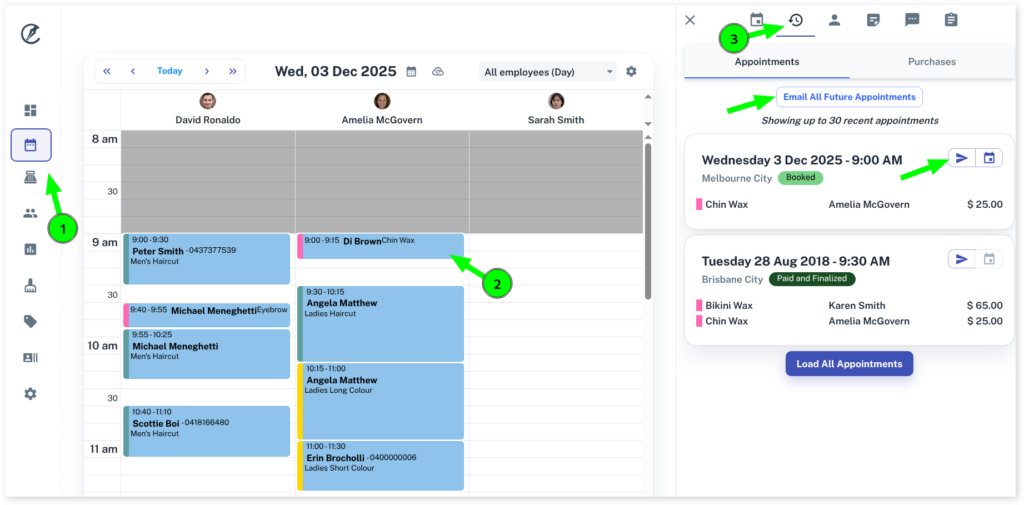
- Selecting the Calendar menu
- Click on the Client’s Appointment
- Press the History tab
In this tab there are two options as shown below with arrows:
- Press Email All Future Appointments button
- Press the individual small buttons to email individual bookings
Make sure the client’s email address is correct and update in the Clients menu if needed.
Only Booked appointments will be included in the email. Cancelled appointments are not.
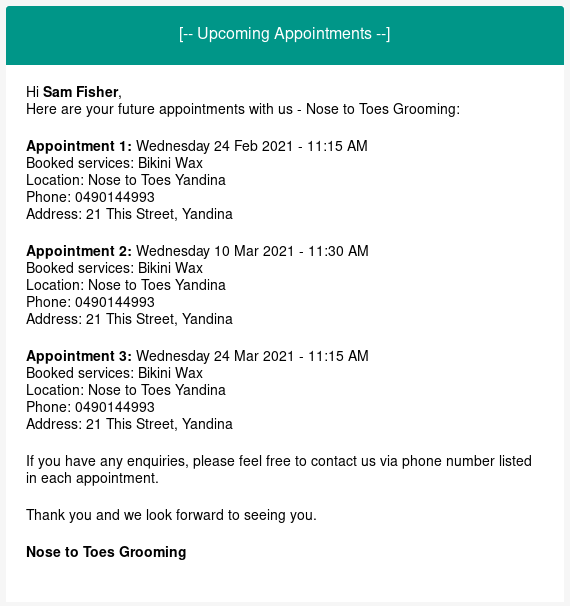
Example of the email sent to your client: