On this page
article
Client Deposits / Client Accounts – Using Client Credits to Pay for a Sale
Learn how to efficiently use client credits for payments in Client Diary by selecting the ‘Use Account Balance’ option during the sale process, allowing flexibility in utilizing available credit and secondary payment methods as needed.
Once a client has money in their account / money in credit, Client Diary lets you easily use the credits to pay for their Services.
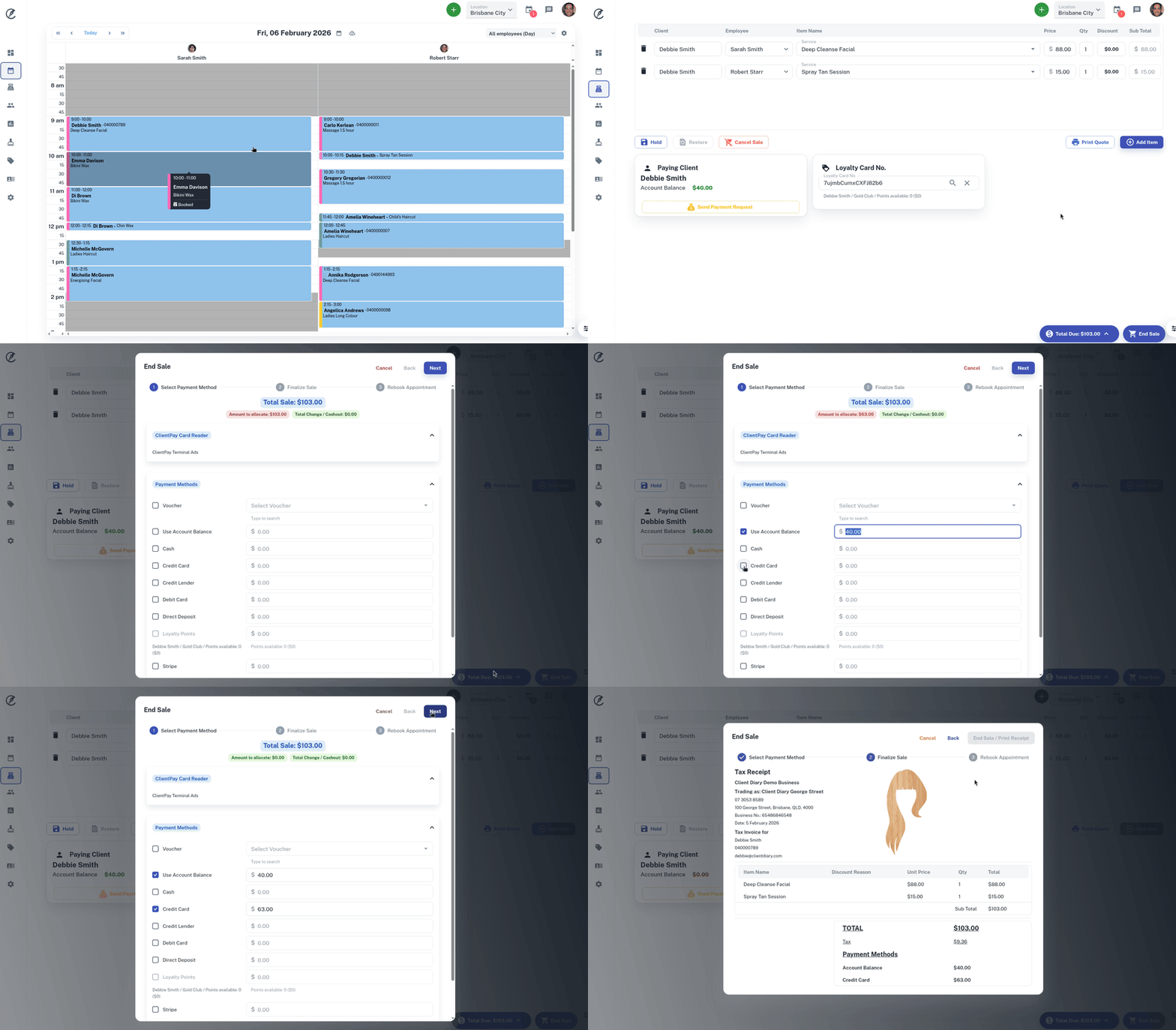
- Take the Client’s Appointment to POS like normal
- Press the End Sale button
- Select the Use Account Balance option. The amount the client has in credit will appear
- End the sale like normal
In the below example, the client has $40 in her account credits to use and the bill comes to $103.
She uses the complete $40 credit and also $63 on her Credit Card.
Important NOTES:
- If they don’t have enough in credit, simply select their secondary payment method to make up the difference
- If they have more than they need in credit, Client Diary will only use what’s required to finalise the sale and the remainder will stay in credit for future use
- If they want to use a different amount / not use all their credit, simply change how much they’re using
- You are also able to use more credit than is shown in the client’s Account Balance. This will essentially put your client’s Account Balance in the red / negative.