On this page
article
How to Create Technical Note For Client
Learn how to create technical notes for clients using different methods such as through the client menu or via the calendar, with steps outlined for each process.
A Technical Note is a little different to a General Note.
- A general note is a note that is simply attached to the client
- A technical note is a note that is attached to the client, but also is attached to a specific service they had.
There different methods to add a Technical Note.
Via the Client Menu
- Go to the Clients Menu
- Search the Client’s Name
- Go to the Notes Tab
- Click on Create New Note

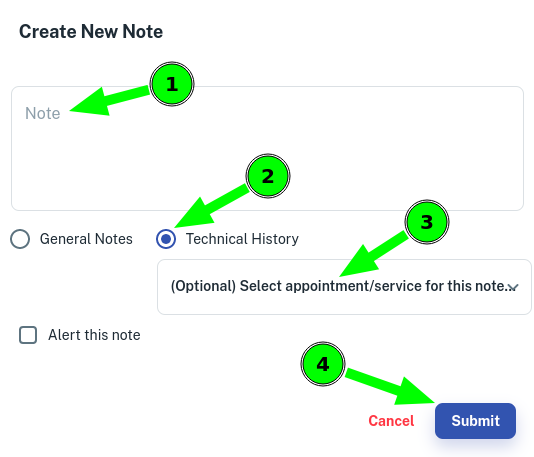
- In the note area, write the Note
- Select Technical History
- Optional: Choose a Service from the drop down menu that you want to attach this note to.
- Click on Submit
Via the Calendar
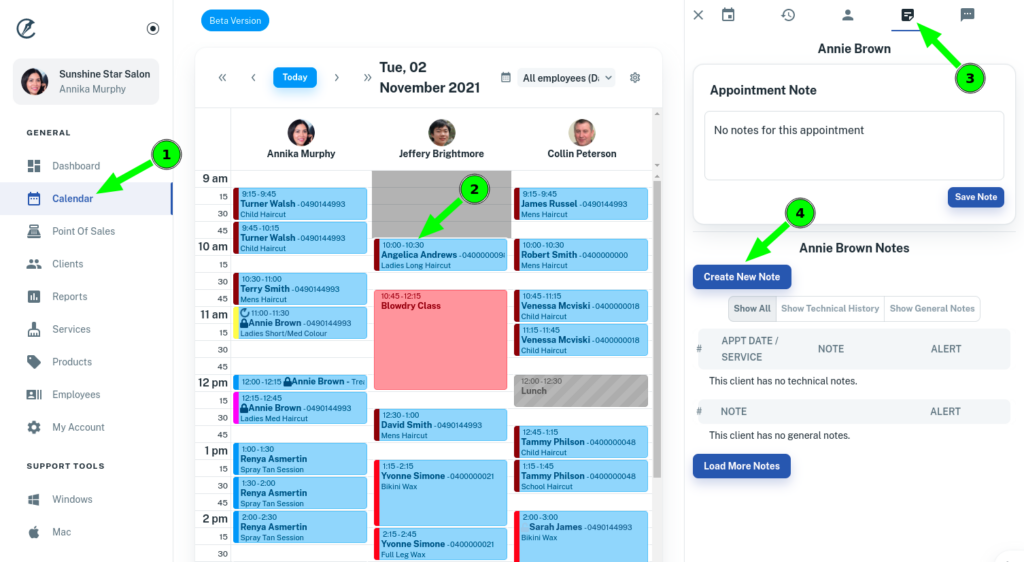
- Go to Calendar Menu
- Select the Appointment
- Click on the Notes Tab
- Press Create New Note
- In the note area, write the Note
- Select Technical History
- Optional: Choose a Service from the drop down menu that you want to attach this note to.
- Click on Submit