On this page
article
How To Delete Client Notes
Learn how to delete client notes either via the Client Menu or Calendar, ensuring data accuracy and privacy with proper security settings.
Notes are a amazing way to keep records on your clients. Sometimes you may need to delete a note, this may be when a mistake is made or to remove old notes that you don’t need anymore.
Their are 2 ways to do this:
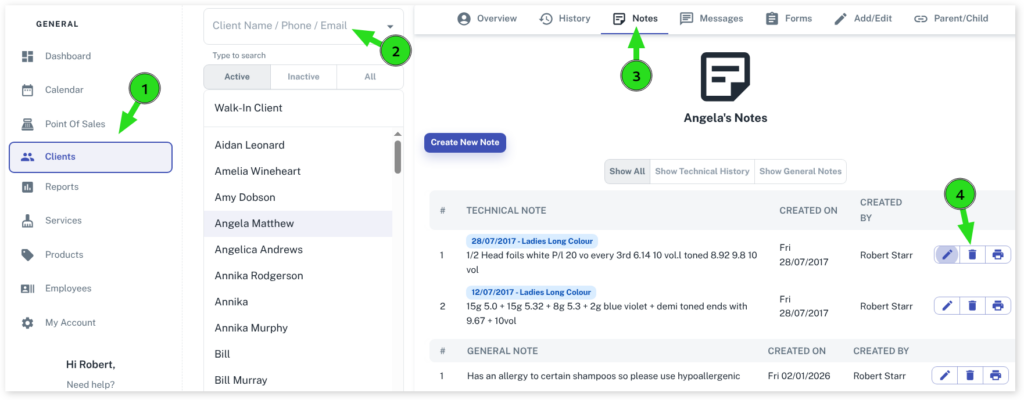
Via the Client Menu
- Select the Clients menu
- Search for the Client Name
- Press the Notestab
- Find the note you want to delete and select the trash icon next to it
- Select the Yes button
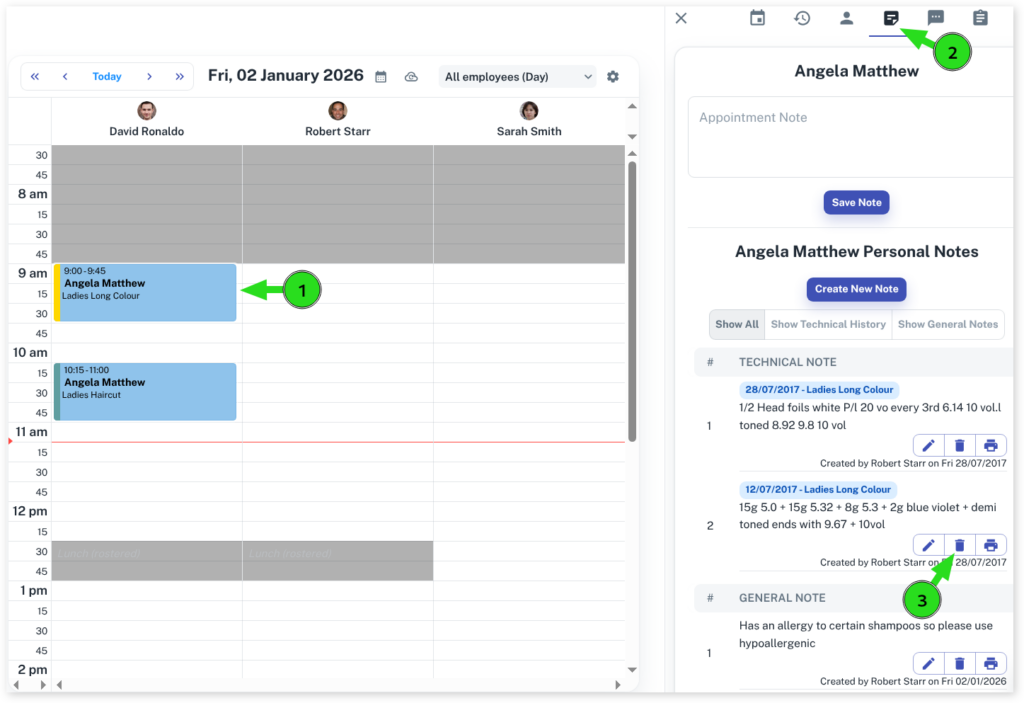
Via the Calendar
- Select the Calendar menu
- Press the Appointment of the note you wish to delete
- Click on the Notestab
- Find the note you want to delete and select the trash icon next to it
- Select the Yes button
Security Settings
Only employees with the correct security settings can delete notes. For more information on how to check your security settings, please read this document.