On this page
article
How to Edit a Note
Learn how to easily edit notes for clients and appointments in your calendar or client menu by following these step-by-step instructions.
The details of a note may change over time, from needing a specific shampoo or recording a client has gone from long hair to short hair.
Many reasons could change and editing the notes is the easiest way to pass on the information to the next appointment.
Edit the Note in the Calendar
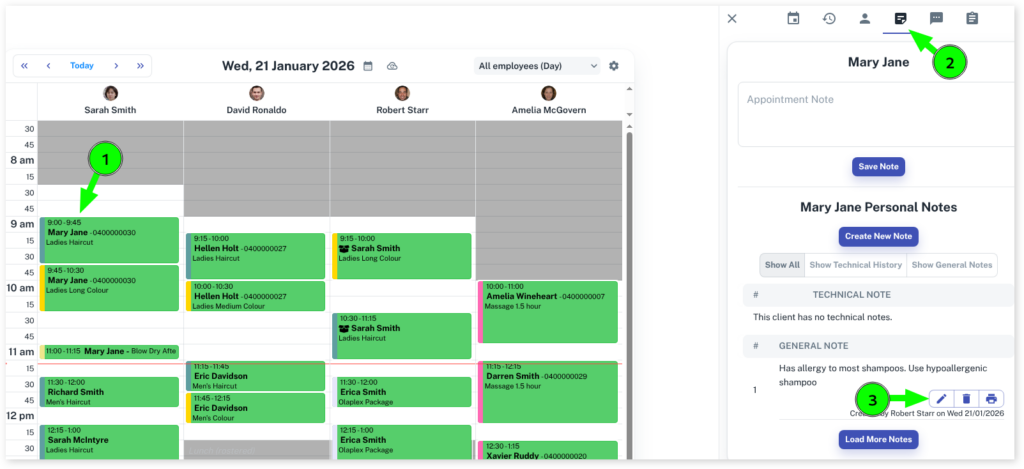
- Open the Calendarmenu
- Select the Appointment of the client you are editing
- Click on Notestab on the right pop up screen
- Optional: For a specific appointment, you can click under Appointment Note
- Optional: For a general note about the client, scroll down slightly and under ‘Clients Name’ Notes and press the pencil symbol to edit the note.
- Press the Submitbutton to apply changes
Edit the Note in the Client Menu
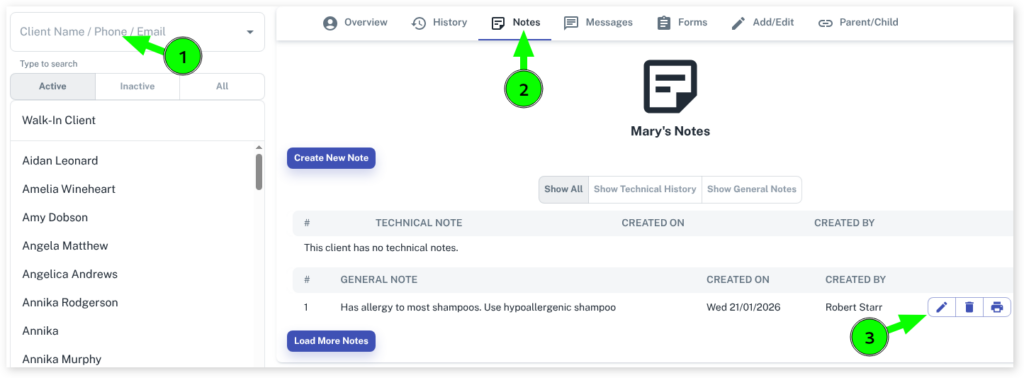
- Select the Clientsmenu
- Search the Client you want to leave a note on
- Click on the Notes tab
- Scroll down to find the note you wish to edit
- Click on the pencil icon at the right of the existing note to edit the note
- Once changes are made click on the Submitbutton to apply changes