On this page
article
How to Edit a Client’s Marketing Preferences
Learn how to customize a client’s marketing preferences by following these steps in your Client Diary account, ensuring they receive only the communications they desire.
You may have a client who doesn’t want to receive SMS Marketing but they love getting their appointment reminders. Or maybe they want email and SMS marketing but that’s all.
To set up their preference simply head to:
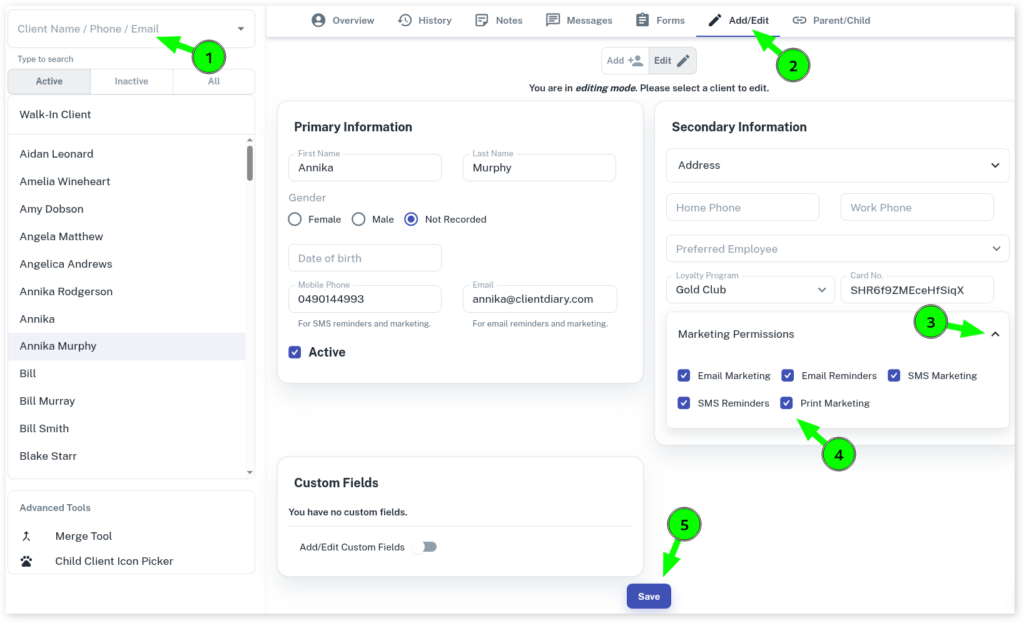
- Select the Clients menu
- Search the Client’s name
- Press the Add/Edit tab
- Scroll the page down to Marketing Permissions
- Click on the down arrow to view/hide marketing permissions
- Tick and untick the options that your client requests
- Click on Save
Note: if a client replies STOP to any marketing it will automatically untick the appropriate box in their marketing options.