How To Apply Service Skills To Employees
Learn how to apply service skills to employees by setting up who can perform specific services, ensuring correct bookings are made, and how to manage service selections through the Employees menu in an online booking system.
There are some businesses where certain employees can do some Services and other employees who can’t. It’s a good idea to set up who can and can’t do those Services so only the correct bookings are made with the correct employees.
This is particularly important if you have online booking turned on as the online booking system will respect the skills of those employees and only book appropriately based on what they can and can’t do.
To setup the Service Skills:
- Select the Employeesmenu
- Press the icon next to the employee’s name

How to Select What Services an Employee Does
- At theService Skills menu you can select either an entire category at once by toggling the checkbox in the heading
- Or you can toggle an individual Service as shown below
- Select on the Save buttonto apply changes once done

When Employee Tries to Book in a Service That has Been Disabled for Them
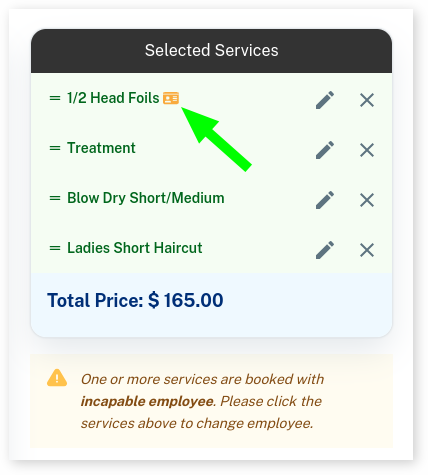
When an employee tries to book a Service that they are disabled from doing, it will come up with a warning under Selected Services as shown in the video below. You can alter the booking so the Service is booked with the correct employee with the skills required as shown below.
When an Online Booking Tries to Book a Service With Employee That Does Not Have the Skills Required
Below shows when a client tries to book a Service with an employee that doesn’t have the skills, the employee is not select-able.
