Marketing to Clients Who Visited a Specific Site / Location
Learn how to market specifically to clients who have visited a particular site using Client Diary’s SMS Marketing tool by following these steps in your account settings, allowing you to target customers based on their first or last visit at a specific location.
If you have more than one site, you may find yourself in a situation where you’d like to only send marketing messages to clients who visit one location but not the other/s. Client Diary allows you to do this easily when using the SMS Marketing (Campaign) tool.
- Select My Account menu
- Press the Marketing tab
- Click on SMS Marketing
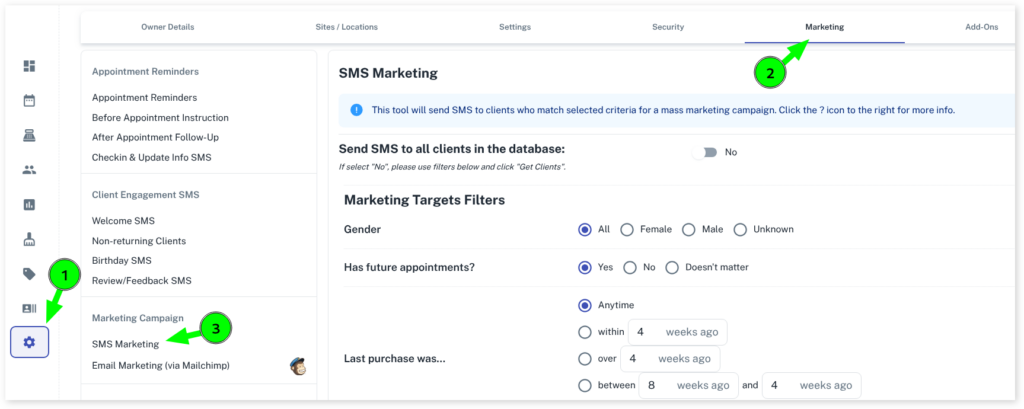
Prepare your options to suit. Examples can be found here to target specific groups of customers.
For targeting for a specific site the following apply:
Doesn’t matter which location means the system will contact clients regardless of where they have visited

First Purchase at… means the customer must have had their first visit to your business at the site/location you choose
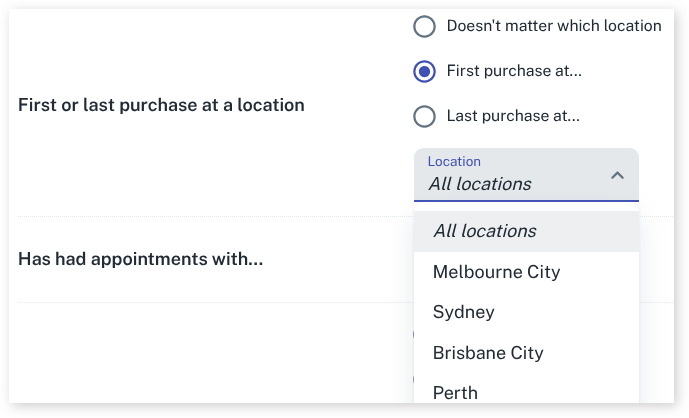
Last purchase at… means the customer must have had their last visit to your business at the site/location you choose

By using this filter option you can target the clients you need from the sites/locations that are important for the current marketing message.