On this page
article
How long Online Bookings Must Be Made Prior To The Appointment
Learn how to set the timeframe for online bookings in Client Diary by adjusting the minimum days and hours in advance that clients can schedule appointments.
Your business may require a specific amount of time to prepare for a clients particular needs, Client Diary has a powerful option in the online booking system that allows you to restrict how far into the future and how close to today a client can make a booking.
To do this:
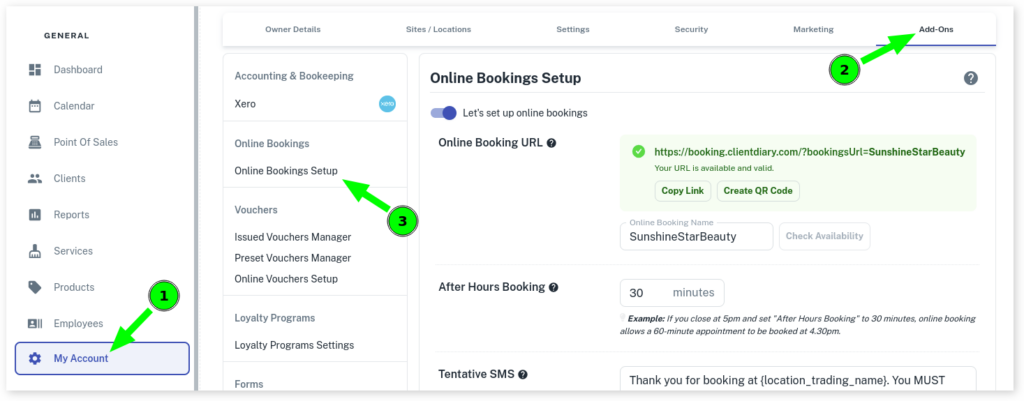
- Select the My Account menu
- Press the Add-Ons tab
- Click on Online Bookings Setup
- Scroll down to Number Of Days Bookings Must Be Made Prior To The Appointment
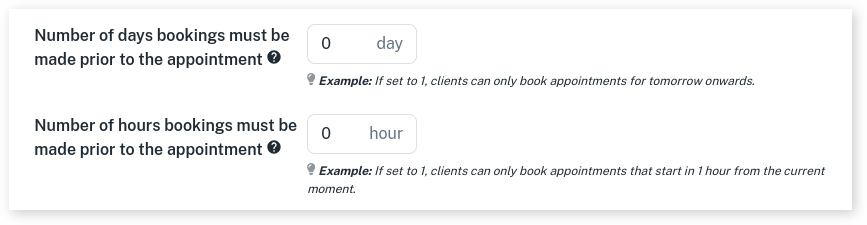
- In the Daysfield, specify the minimum number of days in advance that clients can make a booking.
- Next, you’ll find Number of Hours Bookings Must be Made Prior to the Appointment
- In the Hours, specify the minimum number of hours in advance that clients can book an appointment.
- Press Saveto apply changes