On this page
article
How to Add Custom Terms and Conditions to Your Online Booking
Learn how to easily add custom terms and conditions to your online booking system by following these simple steps in your account settings.
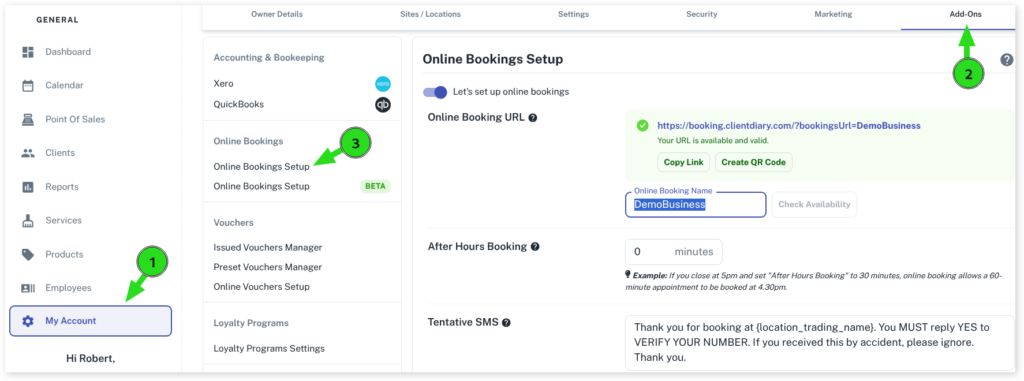
Go to:
- Select the My Accountmenu
- Click on the Add-Ons tab
- Press on the Online Bookingsoption
- Scroll down to the Term & Conditionsheading
- Type or paste your custom conditions in the blank bar on the right
- Click on the Save button to apply changes
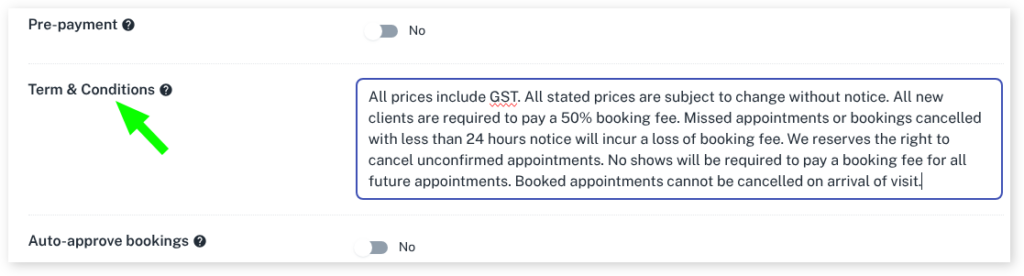
The Terms & Conditions can be viewed by your clients at the Booking Summary when booking an appointment online.
For more info on Online Booking please read our Online Booking Overview.