On this page
article
List of Appointments Report
Easily print out upcoming appointments with Client Diary’s special report, showing client details, last two appointments, and technical histories for better client servicing, accessible through the Calendar by selecting staff, date range, and exporting the report.
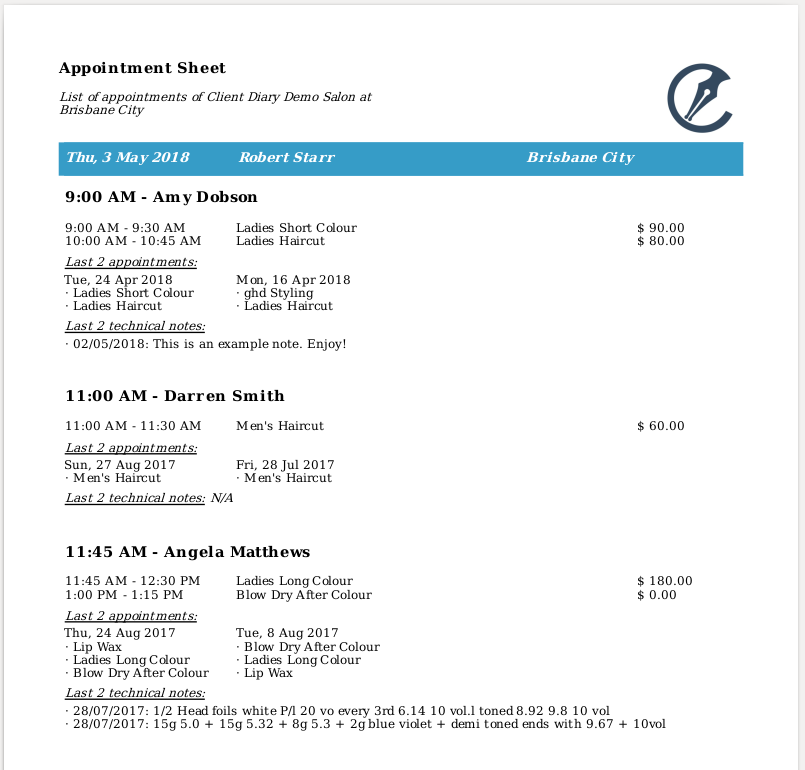
Client Diary allows you to easily print out your upcoming appointments. This special report allows you to choose specific staff or all staff and when printed it shows:
- Client name and current appointment details
- Last two appointments
- Last two technical histories
This allows your staff to easily see pertinent information on the clients they are servicing that day.
To View / Print the Report
- Go to the Calendar
- Press the cog icon in the top right hand corner
- Click on the Download Appointments button
- Select the Date Range for the appointments you want in the report
- Select the Staff you want to be in the report
- Optional: press Select Everyone button
- Click on Export to download the report.

The screenshot below shows an example of what the report will look like: