How to Move from Classic to NEW Online Booking Setup
Client Diary has officially launched the new booking system. It is time to make the move. Here is everything you need to know for moving from our Classic Online Booking Setup to a new and improved version
What’s New?
The new Online Booking system introduces a modern, mobile-friendly interface designed to make online scheduling faster and more flexible for both your business and your clients.
Replacing the legacy Classic version, it features:
- Streamlined prepayments and
- Deposit processing,
- Smart gap-prevention scheduling,
- Support for service tags and bundles,
- A picture gallery and
- Improved multi-location management.

Setting Up Your New Online Booking Setup
The Online Booking Setup is detailed but straightforward and rather quick to set up.
-
Helpful links for specific features can also be found HERE
Toggling the Online Booking Setup ON/OFF
Toggling Online Booking ON or OFF controls both the Classic and New versions together. When switching to the New Online Booking, you can leave Classic turned on. Just make sure to update your website and social media buttons with your new Online Booking link.
Frequently Asked Questions
Can I use the same booking link?
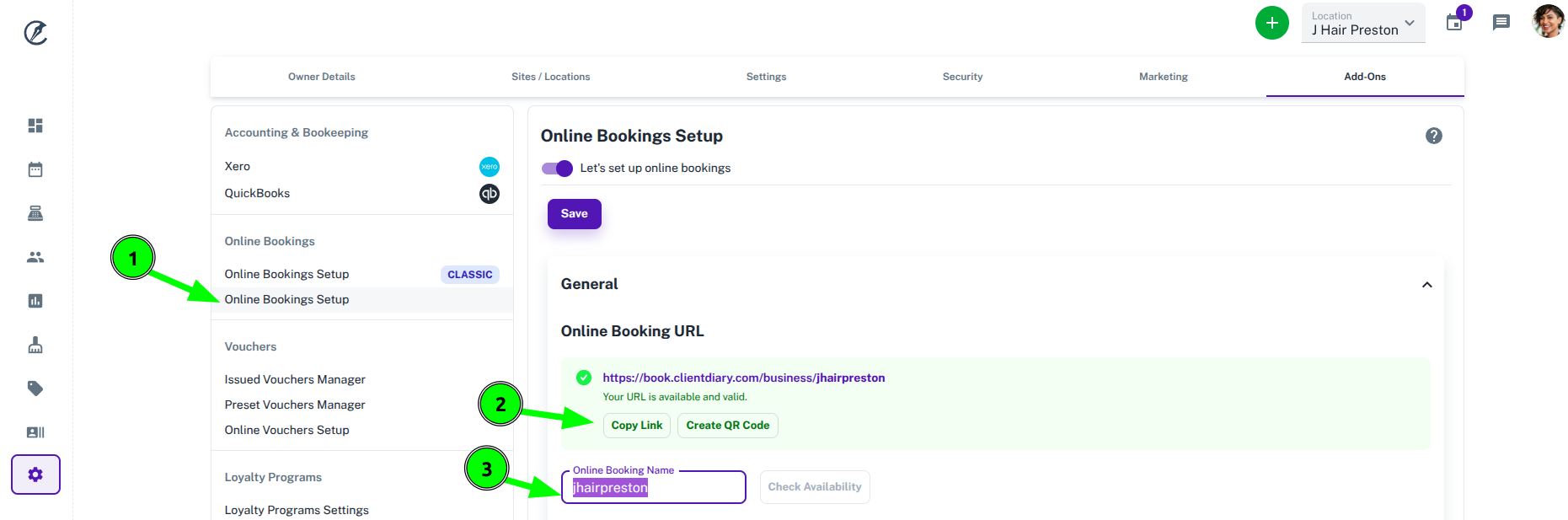
No, the new Online Booking Setup comes with a new booking link. To find the new booking link:
- Click on the new Online Booking Setup
- You will see your link here and can press the Copy button to copy the link
- You can also change the name on the booking link if you like
How do I update my booking link on my website and social media?
Copy the new URL (explained above), then navigate to your social media profiles and update the link field or action button in your profile settings. Be sure to also paste the updated link into any “Book Now” buttons on your website and link-in-bio pages.
To update your website, log into your website builder (such as Wix, Squarespace, or WordPress) and open the page editor. Click directly on your “Book Now” button or menu navigation link, paste your new booking URL into the button settings, and save or publish your changes. If you have a website designer you can simply send them the new link to make the updates to your site.
Can I run both the Classic and New Online Booking at the same time?
Yes, you can run both, in fact they are both toggled on simulatenously. We strongly recommend using the New Online Booking Portal link because the Classic version is now legacy software and no longer supported or updated. Upgrading ensures your booking system remains secure, reliable, and compatible with modern web browsers while giving you access to all future features.
What will be different for my clients?
Client can now create an account to use the Online Booking Portal. This is a quick, one-time setup that keeps them securely logged in for future visits. As long as they sign up using the same phone number listed in their Client Diary client file, their account will automatically link to their existing profile and booking history.
What did you like?
What went wrong?